> ## Documentation Index
> Fetch the complete documentation index at: https://docs.firstresonance.io/llms.txt
> Use this file to discover all available pages before exploring further.
# Manage projects and charge accounts
> Maintain the project and charge account lists that purchase order lines are tagged with.
Purchase order lines can carry a **Project** and a **Charge Account**, so a purchase can be traced to the programme it's for and the account it's charged to. Both come from lists your organization maintains. The two lists are independent: a project isn't tied to one charge account, so the same project can be charged to different accounts on different lines.
Each entry has a **code**, which is unique in your organization, and a **title**. Pickers show both and let you search either.
## Manage projects
1. In ION, go to **Settings > Supply Chain > Projects**.
2. To add a project, click **Create Project** and enter its code and title.
3. To edit a project, click its code.
4. To retire a project, click the archive icon on its row. It moves to the **Archived** tab, where **Unarchive** brings it back.
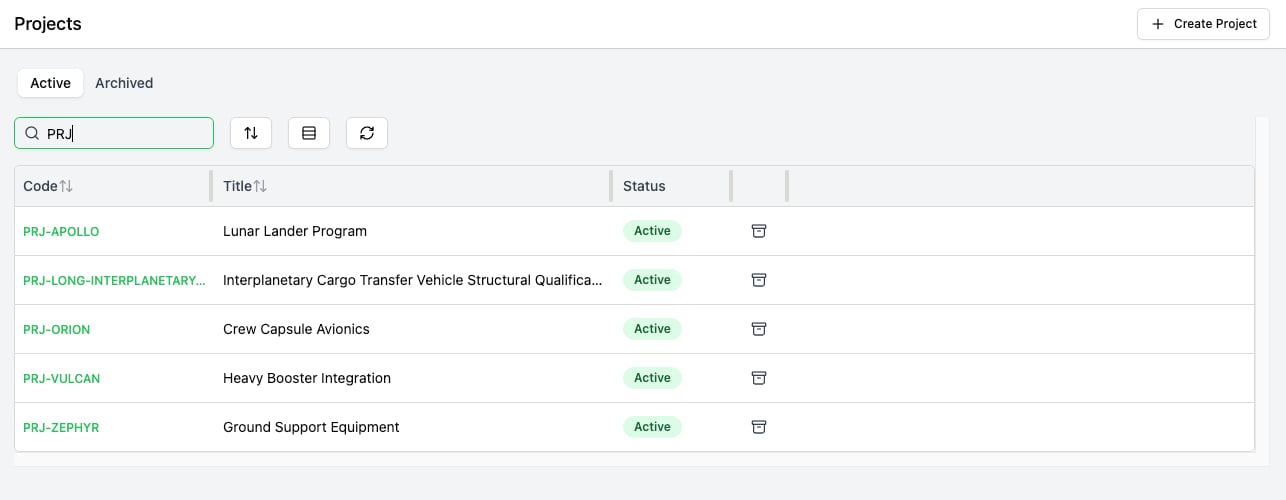 Archiving doesn't remove a project from purchase order lines that already use it. Those lines keep showing it, but it can't be picked for new lines. An archived project can't be edited from this page: only **Unarchive** is offered.
Creating a project needs the **CreateProject** permission, and editing or archiving one needs **UpdateProject**. Admins have both. Someone with neither sees the list as read-only, with a note that projects may be managed in your organization's ERP. To grant the permissions, see [Manage role permissions](/administration/users-and-permissions/manage-role-permissions).
## Manage charge accounts
Charge accounts have no settings page yet. They're maintained through the API: `createChargeAccount` takes a `code`, a `title`, and optionally `archived`; `updateChargeAccount` takes the account's `id` and `etag` plus any of those fields; and `deleteChargeAccount` takes an `id` and `etag`. Archiving a charge account works the same way as archiving a project.
## Retire an entry: archive, don't delete
Archive a project or charge account to retire it. The API also has `deleteProject` and `deleteChargeAccount`, but a delete is refused while any purchase order line still uses the entry, so it only works on entries that were never used.
## Related topics
- [Create a purchase order](/manage-supply-chain/purchasing/create-a-purchase-order.md)
- [Custom attributes](/administration/custom-attributes.md)
- [ChargeAccount](/api-reference/types/ChargeAccount.md)
- [chargeAccount](/api-reference/queries/chargeAccount.md)
- [chargeAccounts](/api-reference/queries/chargeAccounts.md)
Archiving doesn't remove a project from purchase order lines that already use it. Those lines keep showing it, but it can't be picked for new lines. An archived project can't be edited from this page: only **Unarchive** is offered.
Creating a project needs the **CreateProject** permission, and editing or archiving one needs **UpdateProject**. Admins have both. Someone with neither sees the list as read-only, with a note that projects may be managed in your organization's ERP. To grant the permissions, see [Manage role permissions](/administration/users-and-permissions/manage-role-permissions).
## Manage charge accounts
Charge accounts have no settings page yet. They're maintained through the API: `createChargeAccount` takes a `code`, a `title`, and optionally `archived`; `updateChargeAccount` takes the account's `id` and `etag` plus any of those fields; and `deleteChargeAccount` takes an `id` and `etag`. Archiving a charge account works the same way as archiving a project.
## Retire an entry: archive, don't delete
Archive a project or charge account to retire it. The API also has `deleteProject` and `deleteChargeAccount`, but a delete is refused while any purchase order line still uses the entry, so it only works on entries that were never used.
## Related topics
- [Create a purchase order](/manage-supply-chain/purchasing/create-a-purchase-order.md)
- [Custom attributes](/administration/custom-attributes.md)
- [ChargeAccount](/api-reference/types/ChargeAccount.md)
- [chargeAccount](/api-reference/queries/chargeAccount.md)
- [chargeAccounts](/api-reference/queries/chargeAccounts.md)