Action anatomy
An action is defined by these parts:- Title: identifies the action and appears in its toast notification and the audit log.
- Target: the entity to watch, such as Run, Issue, or Procedure, chosen from a dropdown. See Action targets for the full list.
- Event (labeled Event Type in the editor): when the action runs against the target, one of Create, Update, or Delete.
- Context: a GraphQL query for the data your code needs, such as the target’s fields, related records, and custom attributes. Your code reads from the result.
- Code: a Python script that runs when the event fires. It reads the context and decides the outcome: raise
ValidationErrorto block the change with a message, raiseValidationWarningto warn without blocking, or do neither to allow it. The code is read-only. It can’t write data or call external systems.
Context query
The context is a GraphQL query that fetches the data your code evaluates. ION runs it against the entity that triggered the action and passes the result to your code.- One entity, plus an optional
me. Query exactly one top-level entity, matching your target. You can addme { ... }as a second top-level selection for data about the acting user. - Use the singular camelCase name of the target as the query name, such as
runfor therunstarget orrunStepforrun_steps. See Action targets for the name of every target. The fields each entity exposes are what GraphiQL introspection returns for it in your environment. $idis resolved for you. ION substitutes the triggering entity’s ID, so$idis a convention you don’t fill in. Compound-key entities take their composite ID parameters instead; see Action targets.- No
edgesand one operation. Don’t use the connection oredgespattern, and define only one query.
Custom attributes
Custom attributes come back as a list underAttributes. Request all of them with Attributes { key value }, or filter to one with Attributes(filters: {key: {eq: "Pedigree"}}). Each attribute object exposes these fields:
key: the attribute name, such as “Pedigree” or “Release Date”.value: the value, which can be a string, number, date, boolean, or select value.id: the attribute record ID.type: the attribute type.allowedIonType: the linked entity type, when the attribute links to one.options: the allowed values for a select attribute.
Data your code receives
Your code gets onecontext dictionary. It always holds the entity you queried (under the target’s singular camelCase key), a changes object, and a currentUser object. It also holds me when your query requested it.
Changes object
changes describes what the event modified. It’s keyed by the camel-cased table name, then by field, and each entry holds { "new": ..., "old": ... }. The old value is null on a create and the new value is null on a delete. Field names are snake-cased, and custom-attribute tables are keyed by the attribute’s name.
A changes object for a procedure update can look like this:
Issue update
Issue update
Inventory update
Inventory update
Part kit update
Part kit update
Run create
Run create
changes to branch on what actually changed rather than the final state. For example, to act only when a procedure’s status changes to released:
*Attributes key, such as partsInventoriesAttributes or runsAttributes, keyed by the attribute’s name.
A few things to know about changes:
- It’s operation-wide. It holds changes for every entity the operation touched, not only your action’s target.
- On a create or delete of the target itself, the target’s own entry is an empty
{}. Custom attributes saved during that same operation still carry their new values. - When one operation changes several records of the same type,
changesreports one set of values for that type. - A custom attribute saved as blank, zero, or
falseis left out ofchangesentirely, so an empty value and an untouched one look the same. step_id,run_step_id, and a redline’sinitial_stateandfinal_statenever appear in it.
changes would let a run through whenever the operation left the attribute untouched, such as an edit that only moves the due date.
Current user
currentUser is always present and describes who performed the change:
roles to gate a change by permission:
Writing action code
Action code is the body of a Python function that receivescontext. You don’t write the def line: ION wraps your code and passes in the context. Raise ValidationError to block the change, raise ValidationWarning to warn, or return without raising to allow it.
- Python 3.6 syntax only. No walrus operator (
:=), no f-string debug (f"{x=}"), nomatchstatements, and noX | Ytype unions. - No imports, no I/O. You can’t import modules or reach the file system, network, or database.
print()output is discarded. - You can use the built-ins (
len,any,all,sum,next,set, and so on), comprehensions,try/except, and local helper functions. - A computation budget applies. A very long computation is stopped with a user-visible error, so avoid deep loops over large collections.
error status and doesn’t run until you fix it.
Blocking and warning
RaisingValidationError blocks the change; raising ValidationWarning lets it save and shows a non-blocking message. Use a validation action for hard requirements, such as a missing required field or an approval gate, and a warning action for soft ones, such as a skipped recommended step. An action raises one or the other, never both.
You can pass a message to either. ION shows it to the user as [Rule {id}] {title} followed by your message; with no message, the user sees just [Rule {id}] {title}.
How multiple actions combine
When an event and target combination matches several actions, those actions are squashed together at run time. Squashing merges both the code and the requested context so every triggered action runs with the data it needs. They run in sequence in an order you don’t control, with validation actions before warning actions so a block takes precedence, and they share one merged context. Keep each action self-contained.When two actions on the same target and event filter the same field differently in their context (for example, both query
Attributes(filters: {...}) with different keys), the merged query fails. Give each filtered field an alias, such as deptAttr: Attributes(filters: {key: {eq: "Department"}}), and reference the alias in your code.CREATE and target RUNS:
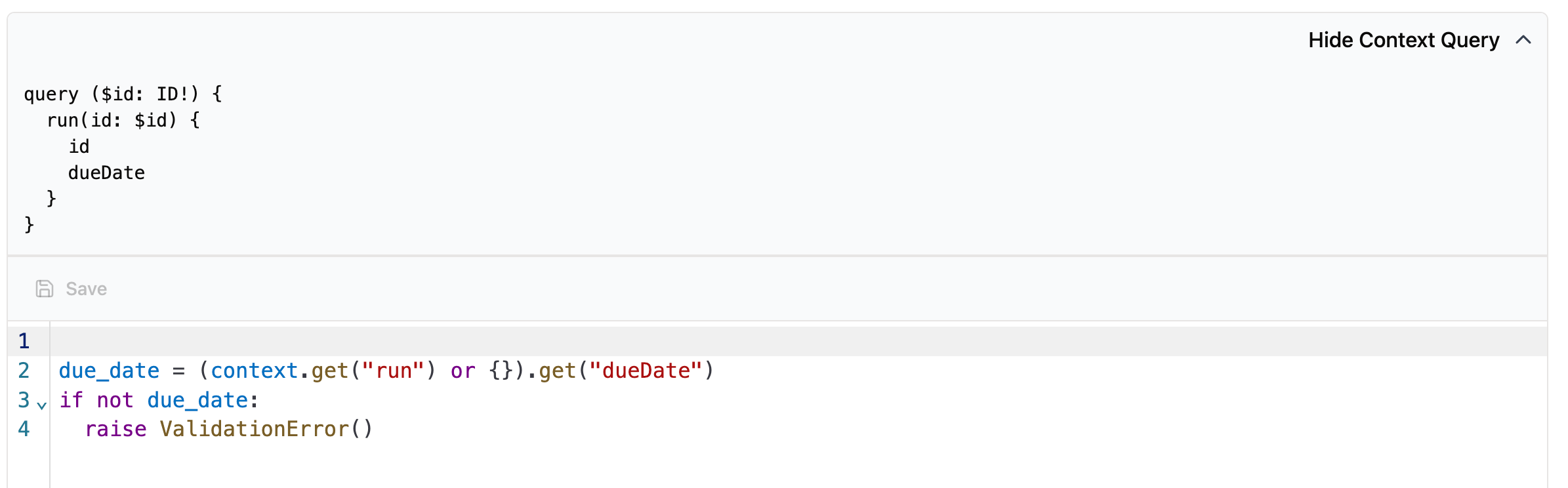
Action 535: on create of a run, checks that dueDate is filled in.
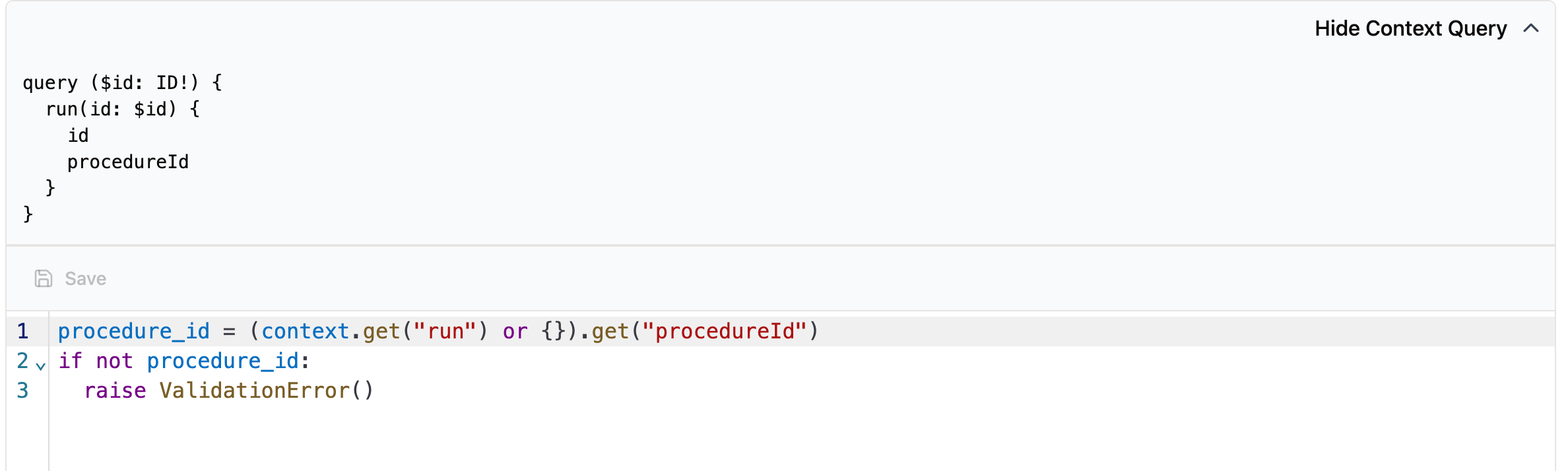
Action 240: on create of a run, checks that procedureId is filled in.
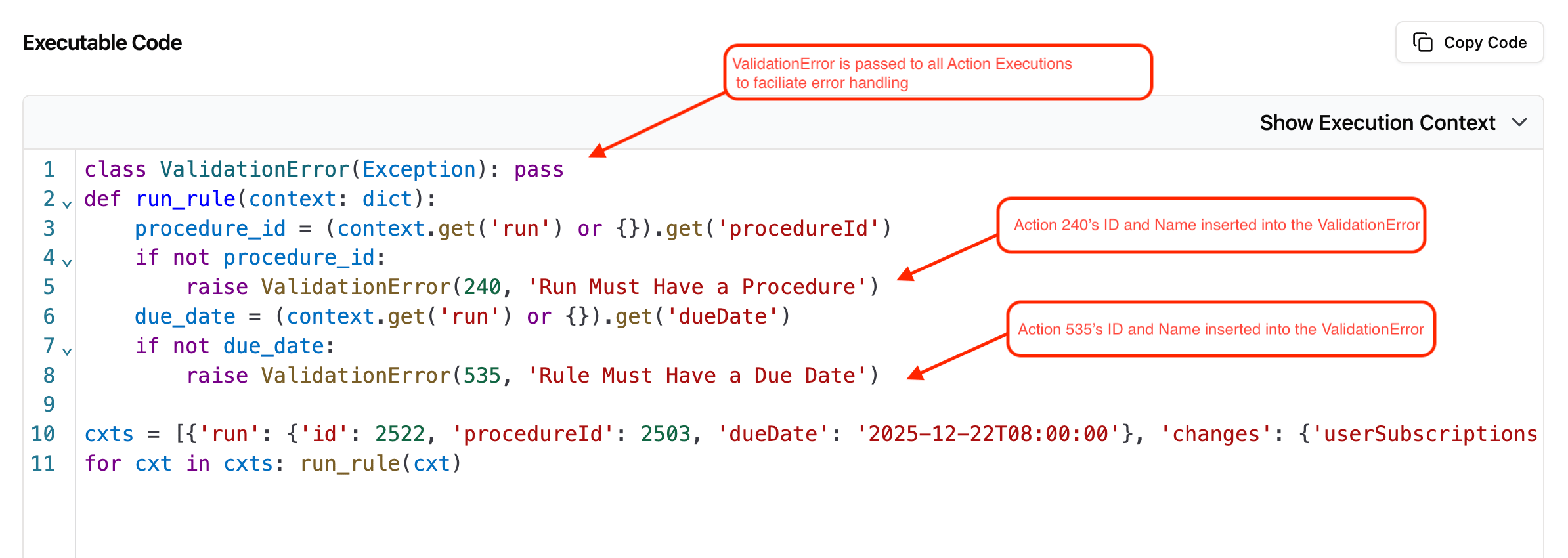
Execution log code for creating a run with both actions enabled.
ValidationError: a class defined in every execution log. If an action raises it, the action’s ID and name are injected into the code so it’s clear which action caused the failure.run_rule: wraps each triggered action into one executable unit and runs them in sequence, with validation actions before warning actions so a block takes precedence.ctx: the combined context for all squashed actions. Each action declares the fields it needs, and squashing merges them into one context object.
dueDate and action 240 requests procedureId, so the resulting context contains both:
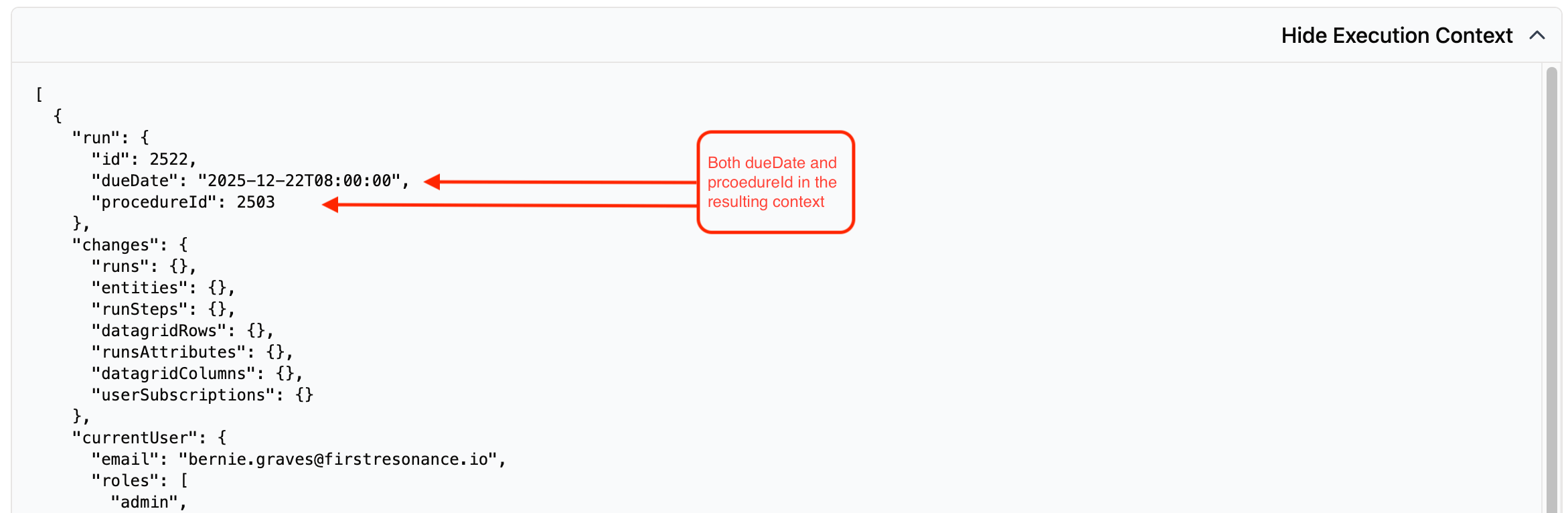
The merged execution context holding both dueDate and procedureId.
Common patterns
-
Read defensively. A chained lookup like
context["run"]["procedure"]["type"]throws if any level isNone. Read one level at a time with a fallback:context.get("run", {}).get("procedure", {}).get("type"). -
Skip early. Return when the action doesn’t apply, so the rest of the code only handles the relevant case.
-
Detect a status change. Compare the new and old values in
changesrather than the final state. -
Find an attribute in a list. Attributes come back as a list of
{key, value}. Pull one withnextand a default.
Seeing what an action did
Every time an action fires, ION records the run in its execution logs: what triggered it, the data it read, and the outcome. Use the logs to debug an action that blocks unexpectedly or never fires. See View action execution logs.Troubleshooting
An action never fires
An action never fires
Confirm the action is enabled and its status is active, that the target matches the entity being changed, and that the event matches the operation. Actions must also be enabled for the organization; see Manage actions. A custom-attribute change fires an
update on the parent entity, not on a separate attribute target.An action errors instead of running
An action errors instead of running
Check the action’s execution logs for the error. Common causes are a context query that requests a field the entity doesn’t have, or a Python syntax error in the code. An action with either problem is saved but sits in an
error status and doesn’t run until you fix it.A custom message doesn't appear
A custom message doesn't appear
ValidationError keeps only a plain string-literal message. A message built from an f-string, a variable, or any other expression is dropped, and the user sees just [Rule {id}] {title}. Pass a literal string.Context data is missing
Context data is missing
The context query must request every field your code reads. Field names are case-sensitive, so
partNumber works and partnumber doesn’t. Custom attributes use a capital Attributes. On a delete event, the query runs against the pre-deletion state.An action stops with a fuel-limit error
An action stops with a fuel-limit error
The action exceeded its computation budget. Simplify the logic, filter attributes in the query with
Attributes(filters: {key: {eq: "..."}}) instead of fetching all of them and filtering in code, or split the work into several smaller actions.A custom attribute change isn't detected
A custom attribute change isn't detected
Attribute changes appear under the entity’s
*Attributes key in changes, such as partsInventoriesAttributes or runsAttributes. They fire an update on the parent entity and are keyed by the attribute’s name, not a column name.