Approve or reject an association
You can approve from either surface:- On the part’s page in the library, in its Procedures section.
- On the procedure’s Overview tab, in the Associated Parts section.
- To approve a pending association, click Approve.
- To reject a pending association, click Reject.
- To move an approved or rejected association back to Pending, click the reset control on that row.
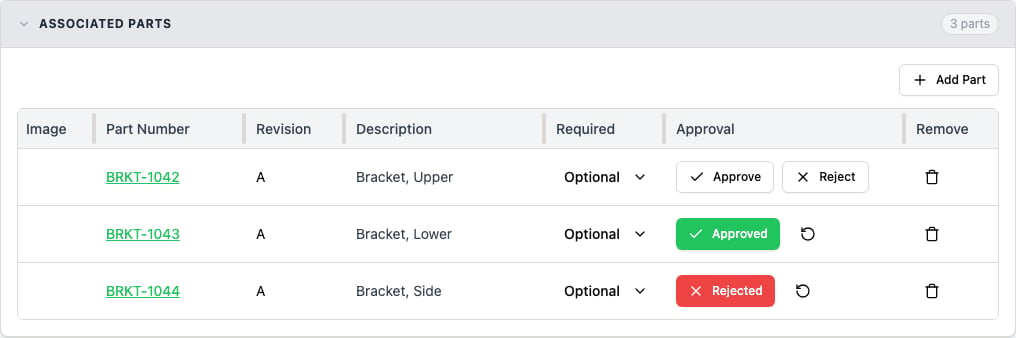
The Associated Parts section on a procedure's Overview tab. The Approval column shows a pending association's Approve and Reject controls, and the Approved and Rejected states each with a reset control beside them.
Only an approved association can start a run when the Require part-procedure relationship setting is on. See Block a run until the association is approved.
Unlink a part from a procedure
You can unlink from either surface. The link is removed without a confirmation prompt.- On the part’s Procedures section, click Remove on the row.
- On the procedure’s Overview tab, in the Associated Parts section, remove the part from the list.
Block a run until the association is approved
To require an approved association before a run can be created, turn on the Require part-procedure relationship org setting. See Configure run enforcement. With the setting on, creating a run for a part and procedure that have no approved association is blocked. A missing, Pending, or Rejected association all block the run. The rule covers both ways of choosing the part: building new inventory, and attaching an item already in inventory. Where the block appears differs between the two:- Building new inventory. The run wizard checks the association as you pick, so the Part step explains the problem and you can’t advance to Review.
- Attaching an existing item. The wizard doesn’t check ahead, so the block arrives when you create the run. The error names the part number and revision you chose, and the procedure title and version it isn’t approved for. Approve the association, then create the run again.
- A Pending association is still selectable and carries a Pending badge. Selecting the pair shows a message naming the part and procedure, with a Review link that opens the procedure in a new tab so you can approve it there.
- A Rejected association is left out of the associated group.
- Any other pair that isn’t approved, such as a part with no association to the procedure, shows the message “The selected part must be associated with and approved for the selected procedure.”
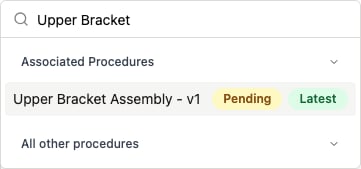
The procedure picker in the run wizard's Part step. A pending association stays selectable and is tagged with a Pending badge.
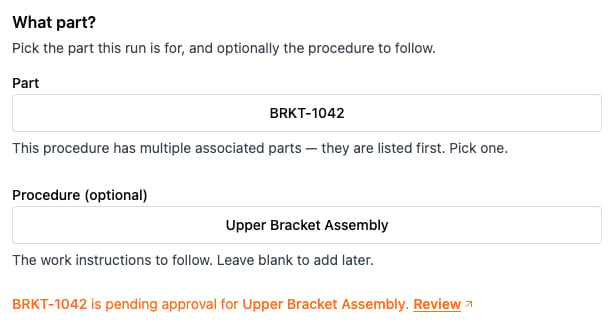
After picking a pending pair, the Part step names the part and procedure and offers a Review link that opens the procedure in a new tab.
Required and optional inspection procedures
When you link a part to an inspection procedure, the Required or Optional setting on the association controls whether an inspection run is created on receipt.- Required: when you receive the part, ION creates an inspection run for it from the associated procedure. The link must be approved, and the procedure can’t be archived.
- Optional: when you receive the part, ION creates no inspection run. You can still start an inspection manually.