Installation requirements are in beta. Review the best practices on this page
before you use them.
Assign installs to a step
Open the procedure’s Steps tab, select a step in the step queue, then open the Assigned Parts section in the right rail.Parts can only be assigned to steps on build-type procedures. On other
procedure types, the Assigned Parts section is unavailable.
The quantity you assign is the minimum installation quantity required to
complete a run step.
2/5). While the procedure is editable, the assigned quantity is an editable field you can adjust directly.
To remove an installation requirement from the step, click the remove control on its row in the assigned list. The requirement removes immediately. The control is available while the procedure is editable.
You don’t choose an mBOM version when you create a run. You select a procedure, and ION resolves
the version by the rule in Which mBOM version governs, so a run’s
aBOM comes from the same version the procedure assigns from. Release mBOMs as needed before you use
them in runs.
Which mBOM version governs
You don’t pick the version freely. ION resolves one governing version per associated part, and the mBOM row names it:
A draft version never governs an unreleased procedure, so a part whose latest version isn’t released has no governing version and nothing to assign from. With the setting off, any pin recorded on the part earlier is ignored. A sub-assembly’s own Sub-assembly row resolves the same way, from its own pin.
Reference designators
Just as you set a minimum quantity to close a step, you can assign reference designators that must be satisfied before the step closes. Assign them per installation requirement from the reference-designator dropdown in the Assigned Parts section. At run time, the operator assigns each installed unit to a specific reference designator, and the step can’t complete until every assigned designator has an install.Switch the pinned mBOM version
Pinning applies only when Enable mBOM version selection is on. With the setting off the procedure follows the part’s latest released version, so the mBOM row is a label with no controls and this section doesn’t apply. Move the procedure’s pin from the mBOM row in Assigned Parts. The version shown there is read-only until you start a switch:- Click Switch on the mBOM row. The version picker becomes editable.
- Pick the version you want.
- Click Confirm.
- A part is Reduced on a step when the new version needs fewer of it than you’ve assigned across steps. ION can’t choose which step to reduce, so it unassigns the part from all of them.
- A part is Removed from a step when the part isn’t in the new version at all.
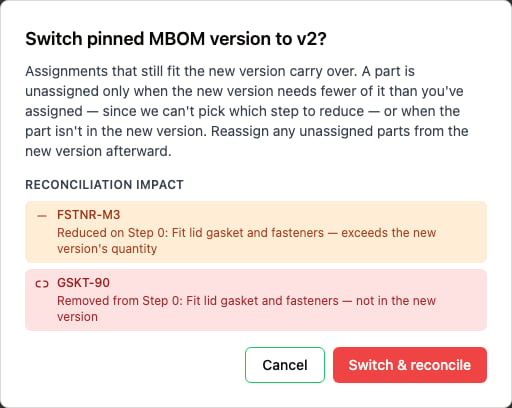
The confirmation shown before a pinned mBOM version changes. Reconciliation impact lists each part that does not carry over, naming the step it affects and the reason.
When Enable mBOM version selection is on, creating a new mBOM revision no
longer copies part-step assignments onto the new revision for procedures that pin
the part, so a fresh revision starts with nothing to clear. With the setting off,
the latest released revision governs and assignments carry forward to the new
revision as before.
When a pinned version is no longer released
When the pinned version leaves Released, such as when it’s archived, nothing governs that part, and review and release stay blocked until you re-pin. The mBOM row warns Pinned mBOM version is no longer released, names the pinned version, and keeps the version picker so you can pin a released version from the same place. While the warning is showing, the mBOM’s items and the assignment progress are hidden, because nothing governs them yet. They come back once you preview a different released version. A sub-assembly’s pin is independent, so a sub-assembly can carry this warning while the top-level part’s pin is fine. On a procedure in review, the warning adds that you must move it back to Draft to pin a new version. A released procedure keeps the version it was pinned to and shows no warning.Remove assignments from another mBOM version
A step can hold assignments from a version of the part’s mBOM other than the one pinned to the procedure, such as one left behind by an import or an earlier revision copy. While that version isn’t Released, those assignments block review and release. To find and remove them:- Click Show n assignments in the blocker message on the procedure’s Overview tab, or the warning icon next to the disabled Move to button in the procedure header. The Steps tab opens on the Off-Pin Assignments section of the right rail, which lists those assignments.
- Click remove on an assignment, then confirm. Removing an assignment can’t be undone.
Install inventory on a run step
You can install inventory from the run step itself, the same way you install inventory on the aBOM. You can’t complete a step until all run step build requirements have their minimum quantities and reference designators satisfied. The inventory list includes any available substitutes. To require mBOM parts to be assigned to steps before a procedure can be released, see Enforce mBOM parts assigned to steps.Permissions
To create, update, and delete installation requirements on procedures, grant yourself a role with theCreateStepPartRequirement, UpdateStepPartRequirement, and DeleteStepPartRequirement permissions.
How ION handles mBOM changes
Your mBOM can change after you release a procedure. For more on changing build requirements, see Editing build requirements. The following changes don’t require a procedure revision:- Removing a part removes the associated installation requirements from associated procedures, so you can remove parts without revising the procedure.
- Updating the part number on an existing mBOM requirement updates all installation requirements in associated procedures automatically with the new part number.
- Updating the name of a reference designator updates all installation requirements in associated procedures automatically with the new reference designator where it is called out.
- Adding substitutes shows the new substitutes on all installation requirements.
- Increasing the quantity of an mBOM requirement has no effect on associated procedures.
- Adding a part. A newly added mBOM part isn’t associated with any procedure until you revise the procedure to assign it to a step.
- Reducing the quantity of an mBOM requirement. You can’t reduce the quantity below what is assigned to a procedure. To reduce it, create a new procedure, then up-version the mBOM.
In every case, there is no effect on existing runs and aBOMs at the time of the
change.
Best practices
- Installs don’t propagate on their own. A sign-off on a batched step propagates to its sibling steps, but a part install stays on the run where you record it, because each run tracks the specific inventory installed in it. To install into every batched run at once, use batch assignment. See Assign aBOM parts across the batch.
- Assign installation requirements while the procedure is in draft. You can add, edit, or remove a step’s installation requirements only while its procedure is in draft; once the procedure is released, its requirements are locked, so up-version to a new draft to change them. You can’t add installation requirements to a standard step in the step library on its own. Assign them on a build-type procedure that calls out the standard step.
- Train technicians on installation requirements. The installation requirements on a step are a minimum. Installing a part through the aBOM counts toward that minimum: ION attributes the install to a run step, selecting the step automatically when the part is required on only one step, or prompting you to choose the step when it’s required on more than one. If you aren’t confident your procedures will stay stable, set the minimum installation quantity to zero and list the needed quantity in the step content, so you can make changes as needed.
- Build requirement quantities on run steps can’t be redlined, and you can’t add or remove a run step’s build requirements mid-run. If your organization has enabled editable run-step build requirements, you can swap a required part for an approved substitute. To allow run steps to complete without required installs, enable
Allow run steps to complete without required installin your run enforcement settings.
As-required, continuous-usage, and consumable parts
Associate a build requirement to a step only when it will always be installed. Add a part as a 0-quantity build requirement to associate it with a step without requiring an install to close the step. A 0-quantity requirement doesn’t block step completion. Use it to surface an optional or as-needed part, and record any actual usage in the step content. To make an install required, set the quantity to any value greater than zero. For example, if you always apply epoxy but the amount differs each time, set the requirement to a quantity greater than zero and note the amount used in the step content. When a part is not always installed, don’t attach it to a step. Instead, you can:- Keep it in the mBOM without a step association.
- Add the build requirement to the aBOM during the run when needed.
- Have an admin enable Allow run steps to complete without required install in the run enforcement settings.
- Update your procedure and build-requirement associations following the best practices in this section to prevent future disruptions.